What is Pillar and Cluster Content? It is an easy method of structuring your blog for Google and your readers.
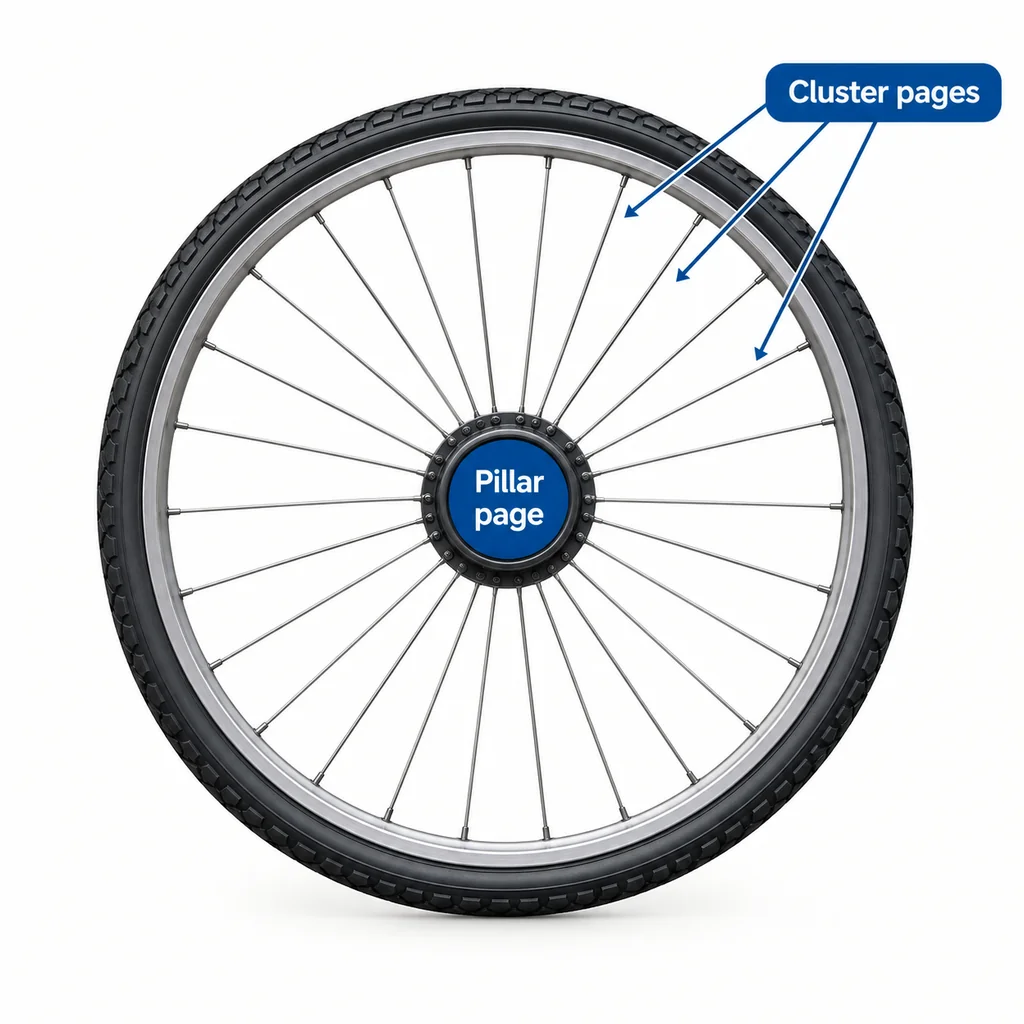
Visualize a bicycle wheel. It has a hub located at the center. There are spokes emanating from it. Without the spokes, the hub would be useless.Without the main hub, the supporting pages have nothing to connect to. Just like a bicycle wheel, this is how a blog works.
It is the format I use on my own blog. I have one pillar post and four cluster posts on local SEO. I am working on another set of SEO Fundamentals. Here’s how I explain them in this guide.
This post is part of my Best SEO fundamentals for Ranking. It also connects with my earlier posts about free vs paid keyword research tools, how to write an SEO blog post and the on-page SEO checklist.
What Is Pillar and Cluster Content?
The pillar page is one comprehensive article written on the wide subject matter. The article captures all of it. The article is not detailed on everything in the article but rather presents an overview. The cluster pages, on the other hand, are short articles on the narrower topic within the main topic.
Think about the mapping process. In the process, you have a city map. You also have some neighbourhood maps which focus on specific areas of the cities. The city maps represent your pillars while the neighbourhood maps represent your clusters.

Each cluster article contains a link to the pillar article. Each pillar article contains links to each of the clusters. These links are known as internal links. They link one page of your website to another.
All of this can be done in one massive post. However, a massive post will be hard to read and maintain. Pillar and cluster content divides the topic into smaller pieces.
The pillar content, together with clusters, makes one group. This is called a topic cluster by some people, and others refer to it as hub and spoke.It’s all based on the same principle.
This is one simple test for identifying pillars and clusters. A page that attempts to capture the entire topic is a pillar, while one that attempts to tackle a single piece of the topic is a cluster.
Why Pillar and Cluster Content Helps You Rank
It does so in three ways.
First, it brings out depth. Many SEOs refer to it as topical authority. This means that Google views you as a credible source of information on one specific topic. It is not an official Google score. However, the logic is straightforward. A site that covers one topic offers more credibility to readers.
Second, it assists Google in discovering your pages. Google follows links to locate content. Then, there would not be any page that is not linked to others.
Third, it helps keep visitors on your website. A visitor who finishes reading one post has the next course of action clear.
That’s a snapshot of what happens. The user reaches your local SEO pillar page. He needs information on citations. Through pillars and clusters, just one click will take him to the relevant post. It doesn’t involve the hassle of searching once again.
In addition, it solves a common issue. Cannibalisation refers to two different pages competing for the same keyword. But by giving each of them its own keyword, it is avoided. You can learn how to give one keyword per post in my guide to writing an SEO blog post: 7 steps from keyword to publication
Pillar and Cluster Content Example 1: My Local SEO Blogs
Here is my first set of pages. The pillar page title is “Local SEO Tips for Small Businesses: A Complete Guide to Attract More Local Customers in 2026”. It includes everything there is to know about local SEO.

The cluster pages around this pillar explore just one particular aspect of the topic, and do so in detail:
- Google Business Profile ranking: “How to Improve Your Google Business Profile Ranking: A Practical Guide for Local Businesses”
- Local citations: a post on getting your business details listed across the web
- Google ratings: a post on improving the ratings your business gets
- Local keyword research: a post on finding the phrases local customers search
A local citation is a listing of your business name, address and phone number on some other site. It is a narrow topic, and it is assigned an entire blog post rather than a couple of paragraphs in a huge guide.
Observe that every cluster page serves one clear purpose. While the Google Business Profile page targets the keyword “google business profile ranking”, the citations page does not compete with it for that search term. Rather, these two pages complement one another. Each cluster page connects back to the pillar. The pillar page connects back to each cluster. Here is simple pillar and cluster content: a single guide and four blog posts.
Pillar and Cluster Content Example 2: My SEO Fundamentals Blogs
The second group consists of the posts you are reading at the moment. The pillar is myBest SEO fundamentals for Ranking. This is an introduction to the type of content that will rank for a beginner. One post per cluster takes care of one stage:
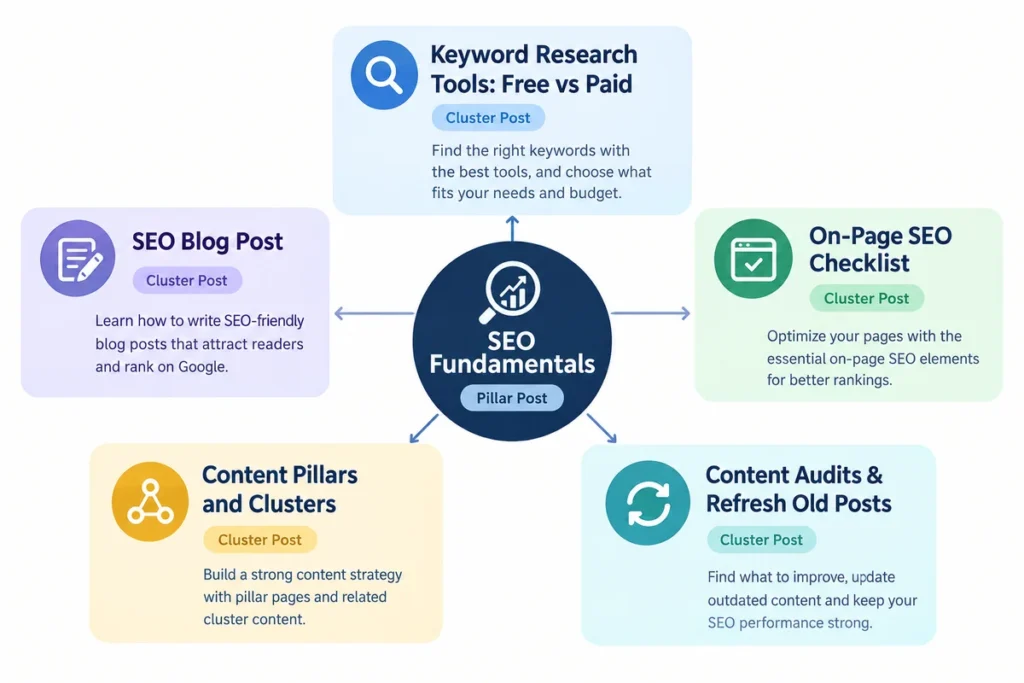
- Keyword tools: free vs paid keyword research tools
- Writing: how to write an SEO blog post
- Polishing: the on-page SEO checklist
- Organising: this post
- Maintaining: What is search intent? Coming next
A content audit is an analysis of the content you have produced before. You evaluate whether each piece of content should be kept, improved upon or discarded.
Note how the posts appear in the sequence a beginner would use them in. You choose your keyword, write the post, edit it, categorize it with other posts and maintain it. Organize your clusters accordingly.
Both groups contain posts following the same sequence. Only the topic changes.
I also verified Google Search Console results for the past three months. Posts from both of my clusters are visible in the search results. Users were searching for “what are local citations”, “improve Google Business Profile rankings” and “on page seo checklist”. They are the same topics as my posts. One user was looking for “what are the pros and cons of using free vs. paid keyword research tools?” That is my tools post.

The numbers are small. Each search above has from 4 to 14 impressions. An impression is an appearance of your page in the search results. None of them had any clicks. The only search that had clicks is my name. It had 5 clicks out of 119 impressions.
It is hard to say whether or not that structure led to the result. I don’t have a “before” stage to compare. However, it gives me insight into what should be done next. Google discovered my pages. Now, I need better headlines and meta descriptions to get more clicks. Exactly what the purpose of my on-page SEO checklist is.
How to Plan Pillar and Cluster Content in 4 Steps
You don’t need a huge team for planning pillar and cluster content. All you need is a notebook and a plan. Here is how I would proceed.
Step 1: Identify one general topic that you are good at. It is going to be your pillar. Select a topic that you could discuss using your practical knowledge. For me, it will be Local SEO.
Step 2: Select sub-topics. What questions would a new person ask about this topic? Look at the “People also ask” box in Google. Keyword tools may also come in handy. Read my guide on choosing the right tool.
Step 3: Assign each cluster page a keyword. Choose an exact phrase for every post. Make sure that each of the posts contains a different keyword. Exact keyword phrases always perform better compared to generic keywords.
Step 4: Link all together. Links transform isolated posts into pillars and clusters. Link each cluster to the pillar. Link the pillar to each cluster. Link related clusters to each other. Write relevant anchor text. Anchor text is the clickable words within the link. “Click here” doesn’t give any information about where you’re linking to.
Good cluster posts answer a single question comprehensively. They link back to the pillar at the very beginning. Then they include another link whenever possible. The pillar page is usually longer than a cluster post. However, that’s not the point. Link everything and explain everything regarding your topic. Don’t stop here.
Go small. One pillar with three or five clusters should suffice. You can build further when needed.
Common Mistakes With Pillar and Cluster Content
The mistakes that I see being made by people are the same few. This is what needs to be avoided while writing pillar and cluster content.
- Narrow pillar. If you choose a very narrow topic for the pillar then it is nothing but a cluster post. Make it broad.
- Two posts for the same keyword. This is known as cannibalization. Assign a phrase to each post.
- Links to the pillar missing. Not linking a cluster post to the pillar post would be like having spokes without a hub.
- Not updating the pillar post after each post. Add the link of the cluster post to the pillar whenever you write a new cluster.
- Cluster posts that lack value. The cluster posts have to offer value even when read separately. Don’t just write short posts to fill the gaps.
Final Thoughts on Pillar and Cluster Content
Let’s do a quick review. If a person asks what pillar and cluster content is, the pillar page contains the overall content. Cluster pages discuss specific aspects in detail’. Internal links connect the pages. Having one keyword per page prevents overlap.
Pillar and cluster structure is not magic. It is simply an effective organization. You assist people to get the information that they need and also help Google understand your website. Select one topic and create one pillar and cluster pages.
Before publishing, answer four questions. Does my pillar contain the full information about my topic? Does each cluster have its own unique keyword? Are there internal links between all pages? Is each cluster useful without the others? Four positive answers mean you are ready.
And then return to tell me how it went.
Written by Remya Nair E , a digital marketing consultant based in Thrissur, Kerala, who has completed hands-on SEO training and works with small businesses on their content and search strategy.
Pingback: Social Media Marketing Guide for Beginners 2026: 5 Steps