
The creation of an SEO blog post begins way before the actual writing takes place.
Every successful journey begins with a well-thought-out plan. It’s like taking a journey; You select your destination first. After that comes the route selection. The packing of the luggage happens after that. Most beginners reverse the process. They begin writing and hope that Google comes knocking.
SEO Blog Posts are posts on blogs that have been optimized in such a way that search engines can locate them, and readers will be happy reading them. SEO refers to search engine optimization, which is just making your web page readable by Google.
This guide covers seven steps. They will help you get from one keyword to a published page. This blog post forms part of my SEO fundamentals beginner’s guide. Go ahead and read it first if you want the whole story.
Step 1: Target One Main Keyword Per Blog Post
A keyword is a word or phrase people enter into Google when looking for information. It is the destination that you should choose at the beginning of your road trip. Make your choice only one per post, and make it specific.
The term “SEO” alone is far too general, and there are thousands of webpages trying to rank for it.The phrase ‘SEO blog post’ is more specific and targeted. People who are inputting the phrase want to create a post that will rank. This is an explicit need. Explicit needs are much easier to fulfil.
And here are my criteria.The phrase should be specific and address one clear need. Also,I should be able to cover the topic clearly and thoroughly.
Larger phrases are not necessarily worse. Specific phrases consisting of more words are called long-tail keywords.These keywords may have lower search volume, but they are much less competitive. This is very good for a beginner blogger.Think of a small pond with less competition, where catching fish is much easier than in the ocean.
After that, I analyze two metrics. First is the search volume. This metric measures the number of monthly searches for the phrase. The second factor to consider is keyword difficulty.
You don’t need a paid tool to get this done. I compared the two in my article on free and paid keyword research tools. First, try the free tools. They will suffice for your blog.
Step 2: Make Sure Your Blog Post Matches Search Intent
Search intent refers to the motive behind the search. The intent is the “why”. Google strives to connect that “why” with the right web page.
Search intent is typically grouped into four main types. Someone might wish to learn something. Someone may want a certain website. Some wish to review choices before making a purchase. Some make purchases right away. Someone looking for an SEO blog post guide seeks knowledge. Thus, a detailed and easy-to-follow guide will be ideal.
Enter your keyword into Google and then view page one. If the search results show that they are guides, lists or tutorials, then Google understands the needs of its users. Emulate their format but do not copy their words.
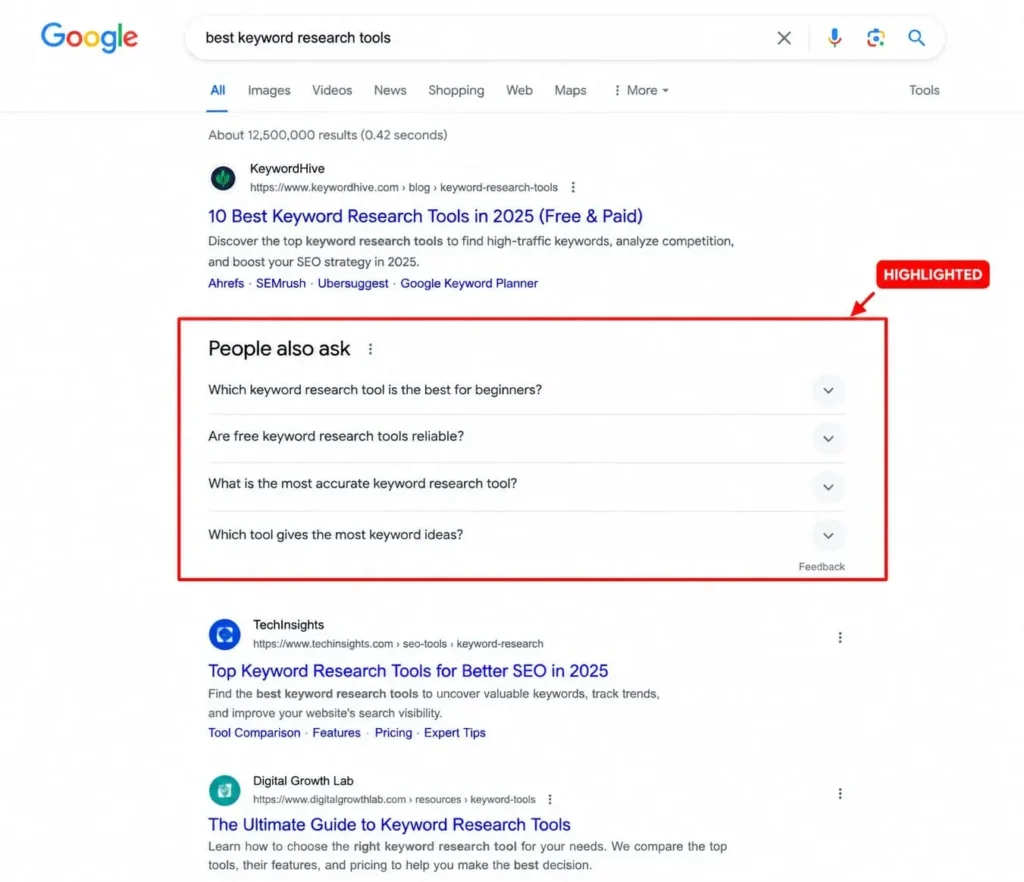
Move your cursor down to the “People also ask” box and note the related searches at the bottom. They offer you some free topic suggestions for your headings. Save those suggestions.
Pose one question. What will the reader do after reading the blog post? Create a post that allows them to do so. SEO blog post readers need actionable steps. Therefore, I offer them such steps.
Step 3: Create a Plan Before Writing Your SEO Blog Post
An outline is like a map. You cannot do without it. Here is a basic form to go by. Begin with an introduction. Put in four to seven main points. Conclude your post with a summary and include two to three bullet points under every H2. That is all it takes.
First, create your headings. A second-level heading is known as an H2. It divides the paper into distinct segments. An H3 heading means H3, which comes within the body of the H2.
Just add your keywords in your H2 headings.Use your keywords naturally throughout the content rather than forcing them into every section. Avoid keyword stuffing, as excessive use can make your writing sound repetitive, unnatural, or robotic.
Try not to include too many paragraphs in each section. Keep each answerable question to a single paragraph. Write a note under every heading about what it needs to prove. This ensures every paragraph serves its purpose well. A well-thought-out outline simplifies SEO blog writing.
Step 4: Write Your SEO Blog Post in Simple Words
Write now. Don’t pay attention to SEO at this stage. The goal is just clarity.
Don’t use long sentences. Use only one concept per sentence. Always define terms when used. A meta description, for instance, is the summary that appears below the headline when you conduct Google search.
Do not exceed three to four lines in a paragraph. A paragraph with too many lines may make your readers feel uncomfortable. Space out your text. Every time you list several concepts, use a list. Write with mobile readers in mind. Your content will be reader-friendly in this manner.
Introduce the keyword in the first 100 characters of your text. This will provide information regarding your webpage to both your audience and Google. But use the keyword naturally. One occurrence of the keyword per 100 words is ideal. Keyword density measures how often a keyword appears in relation to the total number of words. A common range is 1% to 2%.

Think of keywords like salt in a recipe: too little may be ineffective, but too much can spoil the result. You use some amount to bring out the taste. An excess will spoil the entire dish.Overusing keywords can make your writing feel unnatural and robotic.
Also use analogies. It helps in remembering things. Also read your work aloud. If you find it difficult to speak, your reader will find it hard to understand too.
Step 5: Add E-E-A-T to Your SEO Blog Post
E-E-A-T is an acronym that represents four components: Experience, Expertise, Authoritativeness, and Trustworthiness. Google’s quality guidelines use it to determine whether a webpage is trustworthy. It is not a switch but rather a tool to assess quality.
The initial “E” of E-E-A-T is Experience, which is often overlooked by beginners. This implies demonstrating that one has gone through the experience personally.
I applied this to my blog post “How to Improve Your Google Business Profile Ranking: A Practical Guide for Local Businesses.” This is a cluster page to complement my pillar page “Local SEO Tips for Small Businesses: A Complete Guide to Attract More Local Customers in 2026.
As far as the publication of the blog post is concerned, it stood at 79 in Search Console. After that, I included the keyword in the first 100 characters and changed the meta description. My Rank Math score improved from 89 to 95.
First of all, support your arguments with facts. I usually recommend that my readers read the SEO starter guide from Google itself. It is clear evidence that you are following good advice. You can mention your name, bio and update the date as well.
Step 6: Optimise Your SEO Blog Post Before Publishing
Your first draft is complete. Time to polish it. And here’s my checklist for pre-publication
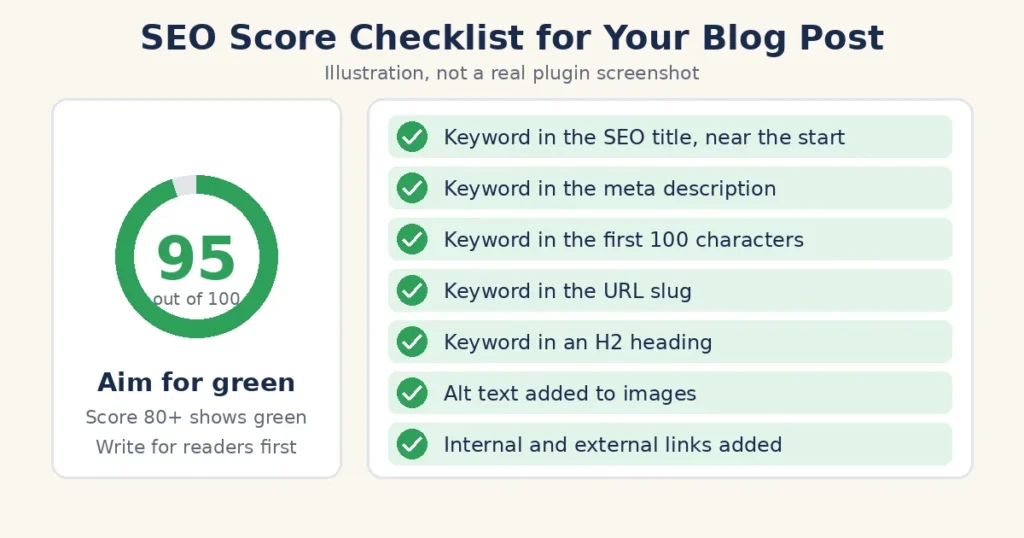
- Title: Under 60 characters. Use the keyword early in the title.
- Meta description: Under 160 characters. Use the keyword. Give readers a reason to click.
- URL slug: Short and readable. Add the keyword.
- Images: Provide alt text. Alt text is a written description in writing of what the picture looks like.
- Internal linking: Link to other blog posts. This allows Google to see connections between pages.
- External links: One or two trusted sources.
If you use WordPress, there’s a plugin called Rank Math that scores these items for you. Aim for green. But always write your sentences to make sense for readers first.
Don’t forget to check the length. No magic word count here. Write as much as needed for the topic. Delete anything superfluous. Clarity beats length.
And lastly, re-read the post. Check spelling. Make sure all links work.
Step 7: Publish and Track Your SEO Blog Post
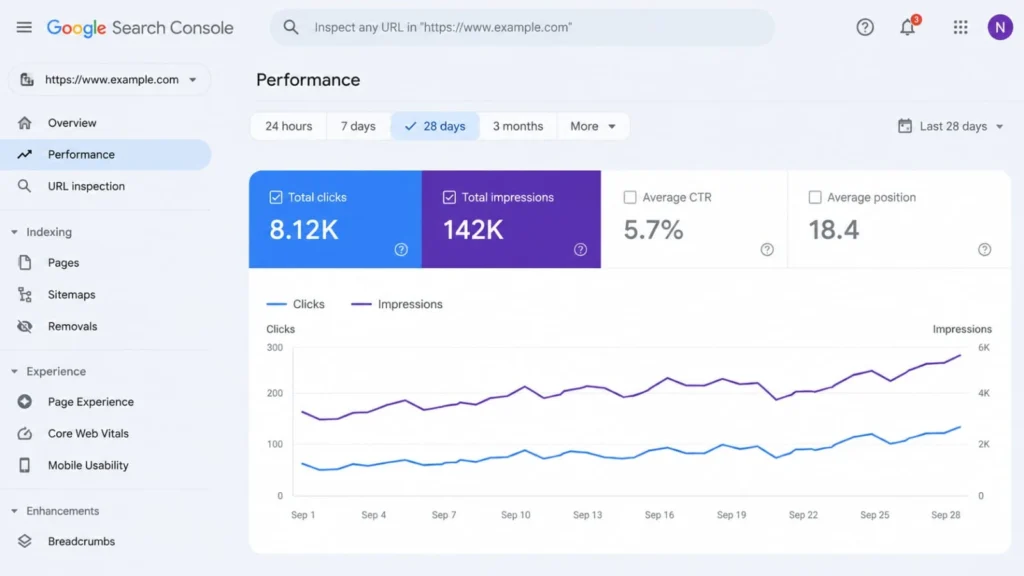
Click publish. Then go to Google Search Console. It is a free Google tool which shows you the performance of your pages in search. Use the URL Inspection tool to request indexing. Indexing is when Google adds your page to its library.
Do another thing after publishing your page. Go back to your old posts. Put a link to the new one where it makes sense. This will tell Google that your new page is important. It will send traffic to it. Share the page on your social media.
Now just wait for a while. It often takes weeks or even months before a page starts ranking. Don’t panic in week one.
After a few weeks, look at two numbers. Impressions – how many times your page appeared in results. Clicks – how many times people clicked on it. Many impressions, but few clicks? You need to improve your title and meta description. Zero impressions? Check if the page was indexed.
An SEO blog post is never really done. Update it every few months. Add fresh examples. Update old facts. Fresh posts will establish trust.
Conclusion
In summary, select a single keyword, examine the intent, create an outline, write simply, add your own experiences, optimize, publish and track.
What I want you to take away from this is this. Write for the user first, then edit for the search engine. Blogging with SEO isn’t magic; it’s a process that you develop the more that you practice.
Every step in the process is a small one. Taken together, they transform a random draft into an SEO blog post that has a real chance of ranking. Use your next topic and start with the seven steps.
Written by Remya Nair E , a digital marketing consultant based in Thrissur, Kerala, who has completed hands-on SEO training and works with small businesses on their content and search strategy.
Pingback: 7 best SEO Fundamentals for Ranking Content in 2026
Pingback: 7 Free vs Paid Keyword Research Tools: Avoid Costly Mistakes