Blog

Your blog category

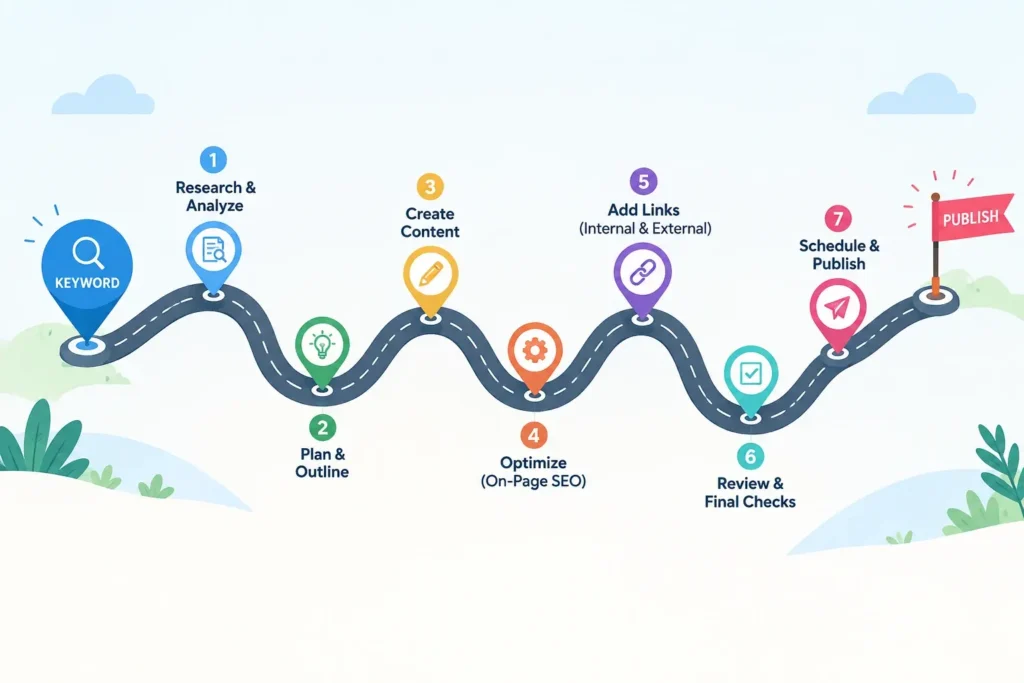
Road map showing 7 steps to write an SEO blog post from keyword to publish
Blog

SEO Blog Post: 7 Easy Steps From Keyword to Publish

The creation of an SEO blog post begins way before the actual writing takes place.  Every successful journey begins with a well-thought-out plan.   It’s like taking a journey; You select your destination first. After that comes the route selection. The packing of the luggage happens after that. Most beginners reverse the process. They begin writing and hope that Google comes knocking. SEO Blog Posts are posts on blogs that have been optimized in such a way that search engines can locate them, and readers will be happy reading them. SEO refers to search engine optimization, which is just making your web page readable by Google. This guide covers seven steps. They will help you get from one keyword to a published page. This blog post forms part of my SEO fundamentals beginner’s guide. Go ahead and read it first if you want the whole story. Step 1: Target One Main Keyword Per Blog Post A keyword is a word or phrase people enter into Google when looking for information.  It is the destination that you should choose at the beginning of your road trip. Make your choice only one per post, and make it specific. The term “SEO” alone is far too general, and there are thousands of webpages trying to rank for it.The phrase ‘SEO blog post’ is more specific and targeted.  People who are inputting the phrase want to create a post that will rank. This is an explicit need. Explicit needs are much easier to fulfil. And here are my criteria.The phrase should be specific and address one clear need.  Also,I should be able to cover the topic clearly and thoroughly.  Larger phrases are not necessarily worse. Specific phrases consisting of more words are called long-tail keywords.These keywords may have lower search volume, but they are much less competitive.  This is very good for a beginner blogger.Think of a small pond with less competition, where catching fish is much easier than in the ocean.  After that, I analyze two metrics. First is the search volume. This metric measures the number of monthly searches for the phrase. The second factor to consider is keyword difficulty.  You don’t need a paid tool to get this done.  I compared the two in my article on free and paid keyword research tools. First, try the free tools. They will suffice for your blog. Step 2: Make Sure Your Blog Post Matches Search Intent Search intent refers to the motive behind the search. The intent is the “why”. Google strives to connect that “why” with the right web page. Search intent is typically grouped into four main types.  Someone might wish to learn something. Someone may want a certain website. Some wish to review choices before making a purchase. Some make purchases right away. Someone looking for an SEO blog post guide seeks knowledge. Thus, a detailed and easy-to-follow guide will be ideal. Enter your keyword into Google and then view page one. If the search results show that they are guides, lists or tutorials, then Google understands the needs of its users. Emulate their format but do not copy their words. Move your cursor down to the “People also ask” box and note the related searches at the bottom. They offer you some free topic suggestions for your headings. Save those suggestions. Pose one question. What will the reader do after reading the blog post? Create a post that allows them to do so. SEO blog post readers need actionable steps. Therefore, I offer them such steps. Step 3: Create a Plan Before Writing Your SEO Blog Post  An outline is like a map. You cannot do without it. Here is a basic form to go by. Begin with an introduction. Put in four to seven main points. Conclude your post with a summary and include two to three bullet points under every H2.  That is all it takes. First, create your headings. A second-level heading is known as an H2. It divides the paper into distinct segments. An H3 heading means H3, which comes within the body of the H2. Just add your keywords in your H2 headings.Use your keywords naturally throughout the content rather than forcing them into every section. Avoid keyword stuffing, as excessive use can make your writing sound repetitive, unnatural, or robotic.  Try not to include too many paragraphs in each section. Keep each answerable question to a single paragraph. Write a note under every heading about what it needs to prove. This ensures every paragraph serves its purpose well. A well-thought-out outline simplifies SEO blog writing. Step 4: Write Your SEO Blog Post in Simple Words Write now. Don’t pay attention to SEO at this stage. The goal is just clarity. Don’t use long sentences. Use only one concept per sentence. Always define terms when used. A meta description, for instance, is the summary that appears below the headline when you conduct Google search. Do not exceed three to four lines in a paragraph. A paragraph with too many lines may make your readers feel uncomfortable. Space out your text. Every time you list several concepts, use a list. Write with mobile readers in mind.  Your content will be reader-friendly in this manner. Introduce the keyword in the first 100 characters of your text. This will provide information regarding your webpage to both your audience and Google. But use the keyword naturally. One occurrence of the keyword per 100 words is ideal. Keyword density measures how often a keyword appears in relation to the total number of words.  A common range is 1% to 2%.  Think of keywords like salt in a recipe: too little may be ineffective, but too much can spoil the result.  You use some amount to bring out the taste. An excess will spoil the entire dish.Overusing keywords can make your writing feel unnatural and robotic. Also use analogies. It helps in remembering things. Also read your work aloud. If you find it difficult to speak, your reader will

keyword research tools illustration with magnifying glass over a search bar
Blog

Keyword Research Tools: Free vs Paid (A Beginner’s Guide)

A keyword research tool performs only one task – it tells you what people are entering on Google before writing a single line of content. Imagine you’re trying to open a little stall selling snacks in your community, you would go around first to find out from people what snacks they would like to eat, not guessing about that. If you have just started your journey in SEO, you must have already been offered dozens of different tools such as Ahrefs, Semrush, Ubersuggest and Google Keyword Planner, and you must be confused about which tool you really need and if the free ones are worth trying. This guide will help you compare the most popular keyword research tools, decide whether to go free or paid, and choose the right one for your needs.  It’s the most obvious next step after mastering the fundamentals of SEO. After understanding the importance of keywords, the next important question is: Which keyword research tool will I use? If you are a one-man band consultant or a small business owner who handles all by yourself, it becomes even more crucial. A large company can afford to give out expensive tools to its clients, but you need to figure out whether or not a certain part of a paid service is worth buying when you can get something similar for free. What Is a Keyword Research Tool, Really? A keyword research tool is an application that provides insights into three key areas. The first one is how many searches there are per month for a particular word or phrase, also known as search volume. The second thing is how difficult it is to get a good rank for that particular phrase. Also, competition or difficulty. The third thing is related keywords or phrases that can be used. The keyword research tool can be thought of as a torchlight in a dark room. Without that tool, we would have no choice but to guess our blog post titles and topics. With a keyword research tool, we can understand what our customers are searching for before writing a single word.  As an example, let us consider a phrase that has two thousand searches per month and is easy to rank for. This will be a much better choice than something no one ever types into Google. Free vs Paid: What Is Actually Different? All the keyword research tools aim to answer all the questions posed above, but the major disadvantage of free keyword research tools is that they restrict the number of searches you are allowed to conduct per day and the extent of the previous data, along with information about competitors. The paid keyword research tools eliminate all the restrictions and offer additional features such as ranking history or keywords your competitors rank for. For a beginner or even an independent digital marketing consultant, the free keyword research tools will be enough. As soon as your list of clients becomes bigger, the paid keyword research tool will pay off for itself. The Best Free Keyword Research Tools Google Keyword Planner This is the keyword research tool that even Google offers for free, and here is where every newcomer should start. The tool was developed primarily for advertisers, which makes it an advertising-focused tool rather than a dedicated SEO tool. Despite being an advertising tool, it offers free keyword suggestions and search volume data after you create a Google Ads account.  Just keep in mind that without a running campaign on Google, Google may provide search volume in a wide range. Google Trends Google Trends may not give you the exact search count, but it lets you know if there is an increase or decrease in the popularity of the keyword over time. It also gives you a regional comparison of the search popularity of the keyword. Google Trends is a useful tool for checking the popularity of a keyword before writing your entire blog post. Ubersuggest (Free Plan) Neil Patel’s Ubersuggest allows you to conduct three searches per day for free, with information such as search volume, difficulty, and even content ideas provided all on one page. Three searches may seem to be not many, but it is sufficient enough to do one blog post. AnswerThePublic (Free Plan) This tool can help you generate real questions that people ask related to the keywords through the use of phrases such as “how,” “why,” “can,” and “versus.” With the free trial version, you are limited to performing three searches per day on Google, YouTube, and other sites, making it perfect for blog topic generation. Keywords Everywhere (Entry Plan) This is a browser add-on and not a dashboard. This add-on stealthily provides you with the search volume numbers along with your regular Google search results. While it is not entirely free anymore, this add-on’s subscription model charges very low monthly fees per year, which makes it one of the cheapest near-free ones available. The Best Paid Keyword Research Tools Ahrefs Ahrefs is considered to be one of the most reliable SEO platforms out there because of the extensive amount of keyword and competitive data that it has to offer. Its pricing package starts at an individual level, with prices going up towards the triple digits per month. Semrush The tool is very similar to Ahrefs, but it offers somewhat more content marketing capabilities on top of its keyword research. The beginning package is affordable for freelancers and startups, while advanced ones are meant for SEO agencies that manage multiple clients.  Moz Pro Moz Pro is an old-school tool when it comes to SEO software; however, users who want to upgrade from a free SEO tool to a paid one usually use Moz because of its ease of use. The introductory plan costs less than Ahrefs and Semrush, even though it has a smaller keyword database than both. Free vs Paid Keyword Research Tools: Quick Comparison Tool Free? Best For Paid Plans Start Around Google Keyword Planner Fully free Absolute

Beginner learning SEO fundamentals on a laptop to create content that ranks
Blog

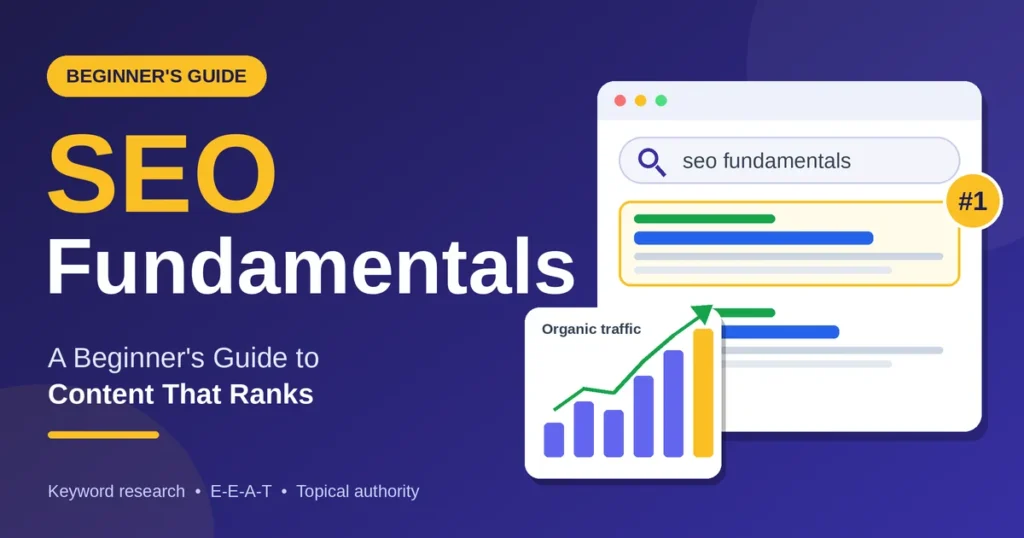
SEO Fundamentals: A Beginner’s Guide to Content That Ranks

Here is the lesson that made me rethink my approach to writing: it’s not enough to create a quality blog post. You also need to understand SEO fundamentals—practices that help Google discover, crawl, and trust your content.  Luckily, SEO fundamentals are easy to grasp.In this article, we’ll explain each of these topics in detail.  So, what are SEO fundamentals?  SEO fundamentals include choosing a relevant keyword that solves users’ problems, being an expert in your niche, and creating on-page SEO copy and related posts. In this guide: · What are SEO fundamentals? ·Keyword Research , Search Intent , E-E-A-T, On-page SEO , Topical authority , Technical basics , Tracking , FAQs What Are SEO Fundamentals? SEO stands for search engine optimization. The basics of SEO are all about what makes your pages easily accessible and understandable to both people and search engines. Picture yourself as a librarian at Google’s library. When people search for answers, your content should provide the information they need. Your goal is to make your content easy for search engines to find and valuable for readers. This is what Google says about SEO in its SEO Starter Guide: “Most SEO is common sense.” Step 1: Find the Keywords Your Audience Searches For A keyword is the phrase that someone uses when they type something into Google. Keyword research is just the process of discovering the phrases that people are already using. No paid software is necessary to begin: Choose one primary keyword for each post, and focus on specific search terms rather than broad keywords. For example, “SEO fundamentals for beginners” is more specific than simply using “SEO.” To compare the software tools, refer to my post on keyword research tools. If your company operates locally, local keyword research becomes slightly different. Step 2: Understand Search Intent Search intent is the motive for performing a search. If someone searches for “what is SEO” on Google, they want to understand the basics of search engine optimization. But if he searches for “SEO Course in Thrissur”, he wants to join the course. First, search your keyword on Google and check the top-ranking pages. See whether the results are blog posts, lists, or product pages. This will tell you what Google thinks people want. Your task is to provide them with the same information, just better. I’ve come across very well-written content that was not successful due to the wrong search intent of the reader. Always check the search intent before creating your content. For reference, I wrote a blog on the topic SEO blog post: from keyword to publish. Step 3: Show Real Experience (E-E-A-T) Experience, Expertise, Authoritativeness, and Trustworthiness – all of this makes up E-E-A-T. It is what Google uses to identify high-quality content, which forms an essential part of SEO basics. You can learn more details from Google’s Helpfulness Content Guidelines. Here is what each element looks like in practice: Experience: Demonstrate your experience doing something. Provide screenshots, results, and mistakes. Expertise: Explain everything correctly and clearly. Include an author bio that shares your background, experience, and expertise.  Authoritativeness: Use references from reputable sources and get mentioned on other websites in the future. Trustworthiness: Be honest. State the date, update outdated facts, and admit failures. Be conversational.Write short sentences and use simple words to make your content easy to understand. If you cannot understand your sentence, rephrase it. Step 4: Set Up On-Page SEO On-page SEO refers to the factors present on the page itself. All of them are small by themselves, but taken together, they tell Google what your article is all about. Use this checklist as a guide when writing each article: Do not keyword stuff. The target is to have your primary keyword appear at 1% of your content, around one appearance per 100 words. Step 5: Build Topical Authority Topical authority involves Google recognizing your website as a credible source of information on one particular topic. One achieves this by creating content on one topic rather than anything else. The simplest way of creating topical authority is by following the pillar and cluster strategy. Pillar content is long-form content that covers a wide range of topics. On the other hand, cluster content is smaller content that digs deeper into a certain area. The links between pillars and clusters go both ways. Local SEO is the pillar of my blog, while the cluster pages include rankings on Google Business Profile, Local Citations and Google Ratings. Learn the complete process through content pillars and clusters. Step 6: Fix the Technical Basics The development of any skills is unnecessary. You just have to make sure that your website contains the following features: responsive design, fast loading time, using HTTPS, and an XML sitemap which is added to Google Search Console. The menu should be straightforward enough so that all of your users can access any page in just two clicks. Step 7: Track Results and Refresh Old Posts SEO does not work on “publish and forget.”Google Search Console is a free tool that shows which search queries bring visitors to your website.  Do a refresh of your old articles every few months – update the facts that may be outdated, rewrite the title, add an extra example, and fix any broken links.  I talk about this in the guide to performing content audits. The timeline depends on your competition and other factors, such as how long your site has existed and how frequently you publish content. Mistakes Beginners Should Avoid FAQs About SEO Fundamentals Is it mandatory for me to use any paid tools to learn the SEO fundamentals? No, because the use of Google Search Console, Google Keyword Planner, and Google Analytics are free. What should be the length of your blog post? Whatever the length needed for covering the topic. Usually, blogs are from 1,200 to 2,000 words but of course, everything must be practical. How can one define a pillar page and a cluster page? The pillar page covers a wider

Local citations helping a business improve local SEO visibility
Blog

Local Citations: What They Are and Why They Matter for Local SEO

Being visible online if you have a local business is not only about creating a website and a Google Business Profile. It is important for people to be able to locate the right information regarding your company online. Here is when citations come into play. You probably have seen the information related to some business on directories, reviews websites, social media, maps, and local business websites. If there was any mention of the business name, address, contact number, etc., then such citation might influence the online presence of the business. If your small business is struggling for clients within a particular city or area, the creation and maintenance of the local citations may assist in achieving local SEO. But what are the local citations? Where to create them? Are citations needed for local SEO anymore? Find out everything about them. What Are Local Citations? A local citation refers to an online reference to your business, which contains vital details such as the following: For instance, assume that there is a restaurant known as ABC Cafe located in Thrissur. If the following appears in a local directory: ABC Cafe  123 Main Road, Thrissur  +91 XXXXX XXXXX  www.example.com Then this would be considered as a local citation. It should be noted that a citation does not have to contain a link to your website for it to serve as a citation. Local citations can be found on various kinds of websites, such as business directories, local news websites, industry-specific directories, review sites, chamber of commerce sites, and social networking sites. Why Do Local Citations Matter? Citations are important since they will help your business become established on the internet. It is essential for search engines to have accurate data about your business so that they can link it with appropriate queries. When the information about your business is consistently correct on all legitimate websites, it will be easy for search engines as well as clients to know about you and your offerings. Here are some of the reasons why businesses should consider citations. 1. They Support Local SEO One of the most important advantages of local citations is that they help in building a local SEO strategy. The concept of local SEO involves making it easier for businesses to be seen by customers searching for their goods or services in a certain location. This may include searches for things like: Local citations will help you to be visible in those searches. Citations are not a ranking factor all by themselves. Rather, they make up a larger component of the local search environment that includes your Google Business Profile, your website, reviews, relevance, prominence, and links. 2. They Build Trust and Credibility Think of a company that is cited on various reliable websites. Everything will match on those sites, from the business name to its phone number, address, and website URL. It will give an impression of credibility. On the other hand, consider a business having three different phone numbers, two different addresses, and mismatched business names on various websites. It can easily cast some doubt upon the legitimacy of the business. Consistent citations can thus increase the trustworthiness of your business online. This applies to small businesses since most people need some reassurance before placing a call or visiting the physical location. 3. They Help Customers Discover Your Business Citation is not just helpful for search engines. People also look up companies via directories and local channels. For instance, a client may look for a photographer in a local directory and not by typing in Google. When your company is cited there with all correct details, you get another chance to make contact with this possible client. It means that an efficient citation approach should pay more attention to visibility and relevance, not numbers of citations. 4. They Improve NAP Consistency The term NAP is commonly used in local SEO. What does NAP mean? Name – Address – Phone number It is necessary to keep the above details consistent while managing local citations. For instance, let’s assume that your business name officially is: Remya Digital Marketing However, various websites refer to your business as: Minor variations are not always bad; however, unnecessary variations can create complications. Your objective is to have the same business data wherever applicable. Where Can You Build Local Citations? There are several areas in which businesses may create their citations. Google Business Profile A Google Business Profile must be one of the first things that a local business needs. It will allow you to share all the necessary details related to your company, like its name, address, phone number, website, category, opening hours, photos, services, and other aspects. Google Business Profile will appear on Google Search as well as Google Maps, which makes it essential. Online Directories for Businesses General directories may offer further options for your business listings. Do not take all directories as useful, however. Concentrate on those that matter. Industry Specific Directories Industry specific websites are especially helpful. Some examples of which include: The citations will help explain what the business does in more detail. Local Directories Local websites and directories are also quite helpful. As far as a business targeting Thrissur, a legitimate local directory that deals with businesses in Thrissur would be much better than a random international directory. Always consider the local relevance of directories when creating citations. Social Media Profiles Profiles of the business on social media like Facebook, Instagram and LinkedIn are also sources of important business information. Though social media profiles are not considered traditional directory citations but do help in the overall business presence on the internet. Structured vs. Unstructured Citations Citations do not have to look similar. Citations are basically categorized into two types: structured citations and unstructured citations. Structured Citations Citations in a structured format are mostly found in directories that are formatted in a particular way. Here is an example: Company Name: ABC BakeryLocation: MG Road, ThrissurContact Number: +91 XXXXX XXXXXWebsite: example.com Directories, mapping

how to increase Google reviews for a local business
Blog

How to Increase Google Reviews: A Best Practical Guide for Local Businesses in 2026

Reviews play a vital role in a consumer’s decision-making process when they are searching for a nearby business. Before visiting a restaurant, salon, clinic, agency, shop, professional services, or any other type of business, most consumers tend to see what our customers have to say . That’s why learning how to increase Google reviews is so important component of local SEO strategy. Reviews from Google are displayed along with your Google Business Profile and help potential customers get acquainted with your business. Google recommends making it easy for people to give you a good review by providing them with a review link or QR code. The main thing is that requesting more reviews does not always mean asking all of your customers for five stars. The right way is to provide a good customer experience and politely request a review. Why Are Google Reviews Important for Local Businesses? Google reviews are valuable for potential customers because they give them a better idea of what it’s like to interact with your business.  Let us imagine that a person is searching for: “Digital Marketing Consultant in Thrissur“ and receives two similar results, one with a few reviews and the other with lots of new and authentic reviews from their clients, this is something that gives people additional confidence when choosing a consultant. Google also says that reviews help companies distinguish themselves from others and give potential clients valuable information. Review responses are also highly recommended, as it allows demonstrating that your clients’ opinions are important. Some benefits of reviews are: But remember one thing: more reviews don’t equal fake reviews. 10 Effective Ways to Increase Google Reviews 1. Provide an Excellent Customer Experience Learning how to increase Google reviews is very simple – give your customers something worth writing a review about. A negative customer experience cannot be fixed simply by asking for a review. Consider every stage of the customer journey:  For instance, if your business is a salon, consider the appointment process, waiting, staff communication, cleanliness, follow-up. 2. Ask for Reviews at the Right Time  When learning how to increase more Google reviews, timing is key. Do not just start asking any of your customers for a Google review out of the blue after they contact you. Rather, choose the times when the customer will be the most satisfied. Here are some examples: Service-based business: Ask soon after finishing the job successfully. Restaurant: Ask after the customer finishes eating his/her meal. Digital marketing consultant: Ask soon after the success of any of your campaigns, audits, consultations, etc. Retail-based business: Ask the customer for a review after they receive the product.  3. Create a Direct Link for Google Reviews One of the easiest ways to increase more reviews from Google is to minimise the number of steps needed by your customers. Google gives you an option to generate a direct review link or QR code for your business. You can use the link in emails or other customer communication channels. Instead of telling them: “Please search for our business on Google and write a review.” Share a direct Google review link to make it easier for customers to leave feedback without having to search for your business.  4. Use a QR Code QR codes are especially helpful for physical establishments. Some places where you can put your QR code for Google Reviews include: E.g;  “Enjoyed your visit? Please take a second to let us know what you think via this QR code.” Google actually recommends using QR codes and links to make the review submission process easy for customers. 5. Send a Personalized Review Request The personalized request sounds much more natural than the automated request. For instance, once you finish a task, you may ask: “Thank you for choosing us. I hope that you enjoyed the services provided. Please share your honest feedback on Google, if you have a few minutes.” Include your Google review link at the end of the message to make it easy for customers to leave feedback.  The review request for local businesses in Thrissur may be integrated into WhatsApp, email, or any other customer communication channels. Focus on encouraging honest feedback instead of asking for positive reviews.  6. Make Reviews Part of Your Regular Process Don’t use reviews as a one-shot campaign. Make a simple request-for-review system. For instance: Service completed by the client → Thank you message → Review link → Follow up → Watch review This ensures that you have a system to regularly collect authentic feedbacks. It’s a far better way than requesting reviews when your review counts seem low. 7. Respond to Your Google Reviews Getting reviews is only one part of the process.  It’s equally important to reply to your reviews. According to Google, it’s important to reply to reviews since it shows that you care about customer feedback. For a positive review, do not copy and paste the response. Instead of: “Thanks for the review.” You could have something like this: “Thanks for writing about your experience, Anu! Glad that you liked our services.” 8. Don’t Ignore Negative Reviews If you wonder how to increase more Google reviews, you might think about focusing solely on good reviews. However, the negative ones are also useful. They will highlight areas where you can improve.  Google mentions that negative reviews do not mean bad business practices; instead, they are good indicators to get acquainted with customer expectations and improve. When replying to negative reviews: For instance: “Sorry to hear about your experience. We would like to understand the situation, please contact us.” This will demonstrate to prospective customers that you take customer feedback seriously. 9. Never Buy or Incentivize Google Reviews This is probably the most critical step in how to increase  Google reviews. Do not pay for reviews. Do not solicit reviews from family members and friends who have never patronised your business. Do not give away discounts, gifts, or free items in return for reviews. Google does not allow

Local keyword research for small businesses
Blog

Local Keyword Research for Small Businesses: A Practical Guide

A presence in search results for a small business when its products or services are being sought within the locality could be crucial. A possible customer may search for “best bakery near me,” “digital marketing consultant in Thrissur” or “dentist in Thrissur.” With the possibility of reaching out to such a customer at the time he or she is seeking, you get better chances of having him or her place an order through a call, email inquiry, website visit or even a store visit. That is why local keyword research is essential for small businesses. Local keyword research enables you to know what your possible customers really search for, their locations, the kind of services they need and how they search for them. Rather than make assumptions about the kinds of keywords to include on your website, you get to base your efforts on the actual behavior of the searcher. As a small business, ranking for as many keywords is not the aim but making local searches work to your advantage. What Is Local Keyword Research? Local keyword research involves the identification and analysis of search terms that people employ while searching for services, products, or local businesses. An example of keywords without location can be: Adding location will result in search terms that will be more locally oriented as follows: The phrase may also consist of such words as: What is really needed is to grasp the terms used by your customers to express their requirements. Why Local Keyword Research Matters for Small Businesses Small businesses generally have limited budgets and resources. Being in competition with large national brands for generic keywords is a tough challenge. Local SEO offers a chance for a small business to target a more niche audience. For instance, the competition for the keyword “digital marketing” would be extremely intense. The keyword “digital marketing consultant in Thrissur” is more specific and targeted.  Local keyword research can assist in: According to Google, their Local Search results depend mainly on the factors of relevance, distance, and prominence. Having complete and accurate business information makes Google know how your business is related to relevant searches. This is the reason why keyword research should not be considered as a separate SEO task. Instead, it needs to complement your website, Google Business Profile, and local content strategy. How Small Businesses Can Find Local Keywords   1.Identify Your Products and Services Before you even open a keyword research tool, write down everything that your business provides. Let us assume that you have a digital marketing business located in Thrissur. Your first list could contain: These are your seed keywords. In case of a bakery, your list will have: This way, you start with your real services. 2. Add Your Location Naturally The next thing would be to incorporate your services with suitable places. Like: Service + Place You could also try other adjacent places that you truly cater to. Like: But you do not need to create pages for each place just to fill them with keywords. The place needs to have business significance and content. 3. Think Like Your Customer Local keywords are quite easy to research if you simply consider the query that your client would be typing in Google. Consider the case where your customer wants a dentist. The search queries include: However, it is also important to note that your customer will not necessarily be looking for a dentist using the keyword “dentist.” Your customer might be looking for something like the best dentist or affordable dentist or emergency dentist etc. 4. Use Google Search Suggestions Google itself could provide some good starting points for conducting local keyword research. Just enter your core service into the search engine and review the auto-completed suggestions. For instance, try entering: Digital marketing consultant in… This way, you could find various combinations based on locations, services offered, or people’s intentions. In addition, you could conduct a search with your core keyword and review the “People also ask” and suggested searches. This way, you could see the questions and terms used by your target audience. The objective is not to use all the suggestions. The goal is to find common themes. 5. Use Google Trends to Understand Search Interest Google Trends will assist you in comparing your search interest and seeing how search interest evolves. You will be able to see what users search for and compare them. The comparisons can be made like these: Geographical analysis can also be performed when enough data is available. Google Trends shouldn’t be considered a tool giving you the precise number of searches per month. Use it as a relative interest tool. 6. Find Long-Tail Local Keywords Long-tail keywords generally consist of more targeted search queries. For instance: Broader term: SEO Narrower geographic term: SEO services in Thrissur Even more narrowed long-tail geographic term: SEO services for small businesses in Thrissur at affordable prices The reason why geographical long-tail searches are good is that they tell a lot about the user’s needs. For instance: SEO doesn’t provide any information on customers’ requirements. But “affordable local SEO services for small businesses in Thrissur” does provide you with more details about the client’s requirements. 7. Understand Local Search Intent Not all keywords will have the same search intent. Search intent is a crucial factor in local keyword research. Informational intent The user is looking for information. Examples: Such keywords are suitable for blogs and guides. Commercial investigation The user is comparing various options. Examples: Such keywords can be suitable for comparison pages of services, case studies, and services content. Transactional intent The user is prepared to make an action. Examples: Such keywords are suitable for service and conversion-oriented pages. Navigational intent The user is looking for a certain business or website. For instance: Knowing all these intentions can help you place keywords on your website. Where Should You Use Local Keywords? Locating relevant keywords is just one half of the process. You must learn to use these

Blog

How to Improve Your Google Business Profile Ranking: A Practical Guide for Local Businesses

If you have a local business, a website may not be enough to drive traffic to your store. In times when people require some products or services, the first thing they would do is go to Google and look for nearby businesses. It is for this reason that your Google Business Profile can be considered one of the most powerful marketing tools for drawing in local customers. It should be noted that having a profile on its own will not make your business appear at the top of Google Maps or local search. To achieve such a result, you will have to maintain an accurate, relevant, active, and credible profile. The performance of your Google Business Profile ranking is what you need to do for it. For small and medium businesses, particularly the ones who have to compete within their city or service area, a good Google Business Profile ranking can be extremely useful. What Is Google Business Profile Ranking? Google Business Profile ranking describes the prominence of your business when it comes up in Google’s local search results and Google Maps when somebody searches for products/services offered by your business. To give an illustration, when somebody searches for “digital marketing consultant in Thrissur” or “best salon near me,” Google needs to identify which businesses would be the most relevant for this specific search query. As stated by Google, local search results depend primarily on relevance, distance, and prominence. This implies that your Google Business Profile ranking is not defined by just one trick. In fact, Google takes into account different factors to determine the relevance of your business for a certain local search query. Why Google Business Profile Ranking Matters Local presence helps to ensure that your business is found by those who are already searching for your offerings. Consider the scenario of a customer looking up “dentist near me”, “Digital Marketing Agency in Thrissur”, or “Best Café in Thrissur”. This is not an exhaustive search. Such searches usually mean that the person has a definite need. A properly managed Google Business Profile can assist you to: This is why Google Business Profile Ranking needs to be seen as an integral part of your overall local SEO strategy rather than just ticking a box. 1. Complete and Verify Your Google Business Profile Step one to ensuring a better Google Business Profile Ranking is claiming and verifying your profile. According to Google, it is advisable to verify your business in order to ensure that you are actually in charge of the profile. Once you have a verified profile, you can update it with correct information about your business. It is important to verify that your profile contains: And other necessary attributes of your business. 2. Choose the Right Primary Business Category This is what your main category will tell Google about your business type. As such, choosing the most fitting and accurate categories is an integral part of optimizing the Google Business Profile. For instance, if you have a bakery, using a category that suits your bakery business is more beneficial than selecting a wide category that has a large audience on the basis of numbers alone. You may even use appropriate secondary categories wherever your business falls under them. Do not choose categories just because you wish to show up in more searches. 3. Write an Informative and Relevant Business Description  A business description is going to be helpful for letting the customers know who you are, what you have to offer, and where you run your business from. This is also the best way to naturally tell about what you do and where you run your business from. Example: “We help businesses build a stronger online presence and connect with more customers through effective digital marketing strategies , including SEO, SMM , Google Ads, and content marketing. As far as the service area goes, you can talk about it whenever it feels natural. However, stuffing the keywords is not at all going to make your writing look good. 4. Keep Your Business Information Consistent Consistency is one of the major considerations in local SEO. The name, address, and phone number of the business should all be consistent between your Google My Business listing, website, and other online directories where you are listed. According to Google, it gets data about any business through many methods like websites, third-party sources, users, and business owners themselves. For example, if the phone number of your business is not the same on Google and on your website, then you need to update it immediately. 5. Add High-Quality Photos and Videos Rather than repeatedly uploading the same stock picture, try to upload authentic pictures of your business. According to your type of business, you can upload: Google itself encourages the addition of pictures and videocasts as it helps the customers to get an idea about your business. In the case of a restaurant in Thrissur, for example, pictures of the interior, pictures of food, entrance and staff members can help in familiarizing prospective customers with your business. 6. Encourage Genuine Customer Reviews Pictures can be helpful in making your Business Profile interesting and informative. Reviews are among the most critical trust indicators for local businesses. By writing authentic reviews, your clients give valuable information to other people that consider doing business with you. Google also mentions that the number of reviews and ratings can positively influence local ranking. Do not buy reviews or write misleading comments, instead encourage your clients to leave authentic reviews. To make it easier, send clients your review link after performing a service for them. For instance:  “Thank you for choosing us. If you were satisfied with our service, we would be grateful if you left an honest review on Google.” The important thing to mention here is that this review should be honest. Do not create any fake reviews just to rank better in Google Business Profile. 7. Respond to Your Reviews Reviews are just one part of reputation

Blog

Local SEO Tips for Small Businesses: A Complete Guide to Attract More Local Customers in 2026

As a small business owner looking to get more local customers, Local SEO tips for small businesses can be a great way to help you achieve this goal. If you operate any type of business ranging from restaurants, salons, cafes, retail stores, or even professional services, there will always be people looking for such services and companies in your area. The following are Local SEO tips for small businesses that will help you increase your online visibility and reach out to local customers. What is Local SEO? Local SEO (Local Search Engine Optimization) is the act of optimizing your website to makesure that your business pops up in search engines when someone is searching forproducts/services within a certain geographic location.As opposed to SEO, which targets a national or international market, Local SEO targetsthose consumers who are near you and are ready to purchase.For example: Local SEO Factors that Google takes into consideration while showing a business include: Use Local SEO Tips for Small Businesses to increase the chance of getting listed on GooglePlaces, Google Maps and Search Results Why Local SEO Matters for SmallBusinesses Customers today depend on Google before making any purchase decision. Some of the reasons why Local SEO is so important include: People Search Before They Visit a Place Most people do online research prior to visiting their local businesses. In their search, theycompare reviews, timings, pictures, and directions. High Purchase Intention The people who are performing such search queries have an intention to buy the products orservices in future. Trust Building and Credibility The more complete and informative the profile of the business is with positive reviews, thebetter chances for gaining the trust of the potential clients. Cost-Effective Marketing Strategy In contrast to other types of marketing, Local SEO provides permanent presence in thesearch engine results. You will not pay for each visit to your website. Benefits of Local SEO The following are the benefits of using the correct Local SEO Tips for Small Businesses: Increased Local Visibility This is because your business will show up whenever customers living nearby are searchingfor particular products or services. Increased Website Traffic Stronger local rankings can increase your website traffic by attracting more relevant visitors. Enhanced Google Maps Appearance If your business is properly optimized, it will likely appear on Google Maps. Higher Conversion Rates In most cases, the local visitors who visit your website are interested in purchasing yourproducts or services. Competitive Edge Most of the small businesses do not pay much attention to Local SEO. You can leverage it togain a competitive advantage and stay ahead of your competitors. How Local SEO Works Google evaluates multiple factors when determining local search rankings, such as: Relevance The relevance of your business to the search performed by the user. Distance The distance between your business and the person searching. Prominence Your reputation and credibility as a company online, which is judged by your reviews,backlinks, citations, and overall online reputation.The more you optimize for those signals, the better your company will rank. Local SEO Tips for Small Businesses 1.Optimize Your Google Business Profile Among the best Local SEO Tips for Small Businesses is the optimization of your GoogleBusiness Profile (formerly Google My Business).Most probably, your Google Business Profile will be one of the first things seen by yourpotential clients on the SERP.To optimize it, you will have to do the following: 2.Research Local Keywords Keyword research is another important step towards increasing local visibility.Keywords to be targeted should not include: However, location-specific keywords would include: These kinds of keywords will be more related to the local customers’ needs.There are several tools available that can help you find keywords with a right balancebetween search volume and competition. These keywords need to be included in theheaders and content on your site. 3.Keep Your NAP Information Consistent NAP stands for: Your NAP details should be precisely the same on your website, Google Business Profile, social media, and online business directory. Example: ABC Bakery  12 MG Road  Calicut, Kerala  98765 43210 4.Encourage and Manage Customer Reviews Online reviews are some of the most effective local ranking factors. They impact customerdecisions even before reaching out or visiting your business.Good reviews help Google to understand that your store is legitimate and provides excellentcustomer service. Best Practices 5.Build Local Citations Local citations are all the online references that have been created using your business’sNAP – Name, Address, and Phone Number.Citations help search engines validate and increase the authenticity of your business data. Common Citation Platforms 6.Create Location-Specific Landing Pages If your company operates in various cities or areas, you can develop landing pages for eachof them separately.For instance, if you are a digital marketing consultant offering your services in different citiesin Kerala, then you can create landing pages such as: Landing pages should have: 7.Optimize Your Website for Mobile Users Local searches are mainly performed via smartphones. The searches may beconducted by travelers or people searching for business nearby.It is necessary to have a responsive website as it will rank well and also provide agood experience to the users. Mobile Optimization Checklist Always test your website using different devices. 8.Improve Website Speed Website speed determines user experience and SEO ranking as well. The probabilitythat users will leave the site because of slow loading is high. Tips for Website Speed 9.Add Local Business Schema Markup Schema markup is data that makes it easier for search engines to comprehend yourwebsite.Incorporating the Local Business Schema could provide you with the following detailsabout your business: The WordPress users can utilize the Rank Math and Yoast SEO plugins for schemamarkup. 10.Build High-Quality Local Backlinks Backlinks still have significance in the ranking factors. In the case of local search engineoptimization, the links from the relevant local websites have more significance. Methods of Acquiring Local Backlinks 11.Optimize On-Page SEO for Local Search All key pages on your site need to be optimized for local search intent.Your Primary Keyword Must Be Used in: 12.Publish Locally Relevant Content Generating local content is a great method

Blog

Why Hire a Freelance Digital Marketer? The Smartest Decision for Business Growth in 2026

Reasons Why You Should Consider a Freelance Digital Marketer | Benefits of Using a Freelance Digital Marketer Find out why you should consider growing your business through SEO, social media, content marketing, and PPC campaigns by utilizing a freelance digital marketer. Introduction In the modern competitive online world, the mere presence of a website or social media account isn’t sufficient. The clients want to see your business on search engines, social media and have the opportunity to get the necessary information. This is when a freelance digital marketer becomes indispensable. If you’re wondering why you should hire a freelance digital marketer, the answer is simple: you gain access to professional marketing expertise without the overhead of hiring a full-time employee at a considerably lower price than if you hired a full-time employee or an agency. No matter if you are running a small business, start-up, eCommerce site or any other kind of local company, a collaboration with a freelance digital marketer will help you create your online presence, draw qualified leads and turn visitors into loyal customers. What Does a Freelance Digital Marketer Do? The freelancer would work as per your business goals and also in line with your target audience requirements. Freelance marketing provides effective communication, quick execution, and personal approach, which is not the case in usual agencies when there are many departments involved. Typically, they offer the following: As opposed to providing general solutions that can fit all, the seasoned freelance marketers will develop strategies according to your niche, target audience, competition, and goals. Why Businesses Are Choosing Freelancers in 2026 There have been some modifications within the realm of digital marketing in recent years. Companies are becoming more adaptable and goal-oriented. Instead of employing a big in-house marketing team, nowadays many organizations are opting for specialists who would help them achieve some particular goal. These factors have increased the demand for freelance digital marketers tremendously. Some of these reasons are: The small businesses can especially get advantages from that, since they will not need to invest in long-term employment expenses. Key Benefits of Hiring a Freelance Digital Marketer 1.Affordable Marketing Services Affordability is one of the most prominent reasons why businesses look for why to hire a freelance digital marketer. It is expensive to have a marketing person working on a full-time basis. These include: `A freelance digital marketer provides professional services that are much cheaper compared to the above. This is because freelancers operate independently, meaning businesses will only pay for what they really need. This makes freelance digital marketers the perfect solution for:  2.Marketing Strategies for Each Business Each business is different from another. A clothing retailer does not have the same marketing priorities as a law office. A restaurant requires a different strategy than an IT firm. Rather than applying general templates, a freelance digital marketer creates custom marketing strategies taking into account: 3.Access to Various Digital Marketing Techniques Another one of the key benefits that the recruitment of a freelancer can bring is an gain access to a wide range of digital marketing expertise without the need to hire multiple specialists. . The proper freelancer should have knowledge about: Instead of managing several SEO professionals, copywriters, and SMM managers, you get an opportunity to work with one specialist who understands the interrelation of all these  4. Flexible and Scalable Marketing Help Marketing Services which are Flexible & Scalable There are always new marketing needs coming up throughout the year for any business. You may need extra marketing support during a product launch, festive season, or special promotional campaign. Other than that, the need for marketing assistance will be minimal. In this case, the freelancing digital marketer makes sure that he or she offers flexibility in scaling his or her services based on your needs. For example, the digital marketer might be hired for services such as: Scalability and flexibility make a freelancing marketer a great choice for startups, small firms, and emerging brands requiring professional help but don’t want to employ someone full time. 5.ROI Enhancement Freelance Digital Marketer considers the following aspects that would enhance the ROI through: As opposed to spending on marketing activities that do not correspond to your goals, a freelancer would help you focus on the correct activities. 6.Gain an Edge with the Latest Digital Marketing Techniques The sphere of digital marketing is always on the move. The search engine algorithms, digital marketing platforms, and behaviors of customers are always being updated. An experienced professional freelance digital marketer stays ahead on: By being updated, they ensure that your marketing strategy keeps pace with the changing digital marketing environment. 7. Save Time and Concentrate on Running Your Business Digital marketing is a continuous process involving research of keywords, content creation, campaign management, monitoring its performance and optimizing the website which all consume time. Hiring a freelance digital marketer will enable the business owner to concentrate on his strengths, running his business efficiently while delegating the task of digital marketing to a professional who specializes in this domain. Some of the benefits include: Common Mistakes that Businesses Make in Digital Marketing without Professionals Businesses try to conduct their digital marketing efforts internally without having any marketing strategies. This may work at first but is bound to fail. Common mistakes made by businesses in digital marketing are:     The lack of SEO means that an optimized website will not be visible to search engines. Failing to produce blogs and social media posts on a regular basis can limit the business’s growth. Campaigns not knowing what the customers want means that all the marketing budget of the business goes in vain. Lack of performance tracking means not knowing which efforts are bringing good returns to the business.   A poor user experience on a website limits the growth of the business even though it gets traffic through marketing. A digital marketer will help the business identify these mistakes and overcome them through strategies. Digital Freelancer Marketer vs. Digital Marketing Agency

Blog

Hello world!

Welcome to WordPress. This is your first post. Edit or delete it, then start writing!

Scroll to Top