Here is the lesson that made me rethink my approach to writing: it’s not enough to create a quality blog post. You also need to understand SEO fundamentals—practices that help Google discover, crawl, and trust your content.
Luckily, SEO fundamentals are easy to grasp.In this article, we’ll explain each of these topics in detail.
So, what are SEO fundamentals?
SEO fundamentals include choosing a relevant keyword that solves users’ problems, being an expert in your niche, and creating on-page SEO copy and related posts.
In this guide: · What are SEO fundamentals? ·Keyword Research , Search Intent , E-E-A-T, On-page SEO , Topical authority , Technical basics , Tracking , FAQs
What Are SEO Fundamentals?
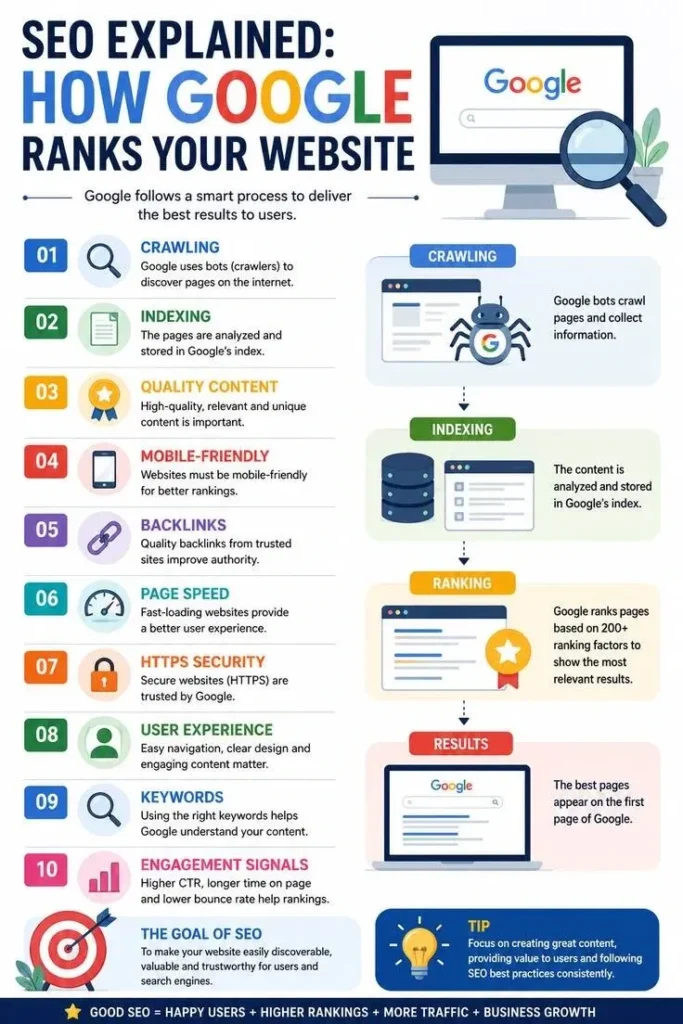
SEO stands for search engine optimization. The basics of SEO are all about what makes your pages easily accessible and understandable to both people and search engines.
Picture yourself as a librarian at Google’s library. When people search for answers, your content should provide the information they need. Your goal is to make your content easy for search engines to find and valuable for readers.
This is what Google says about SEO in its SEO Starter Guide: “Most SEO is common sense.”
Step 1: Find the Keywords Your Audience Searches For
A keyword is the phrase that someone uses when they type something into Google. Keyword research is just the process of discovering the phrases that people are already using.
No paid software is necessary to begin:
- Type your topic into Google and note the suggestions provided.
- Go down to “People also ask” and check the questions.
- Use Google Keyword Planner to check keyword search volume.
Choose one primary keyword for each post, and focus on specific search terms rather than broad keywords. For example, “SEO fundamentals for beginners” is more specific than simply using “SEO.”
To compare the software tools, refer to my post on keyword research tools. If your company operates locally, local keyword research becomes slightly different.
Step 2: Understand Search Intent
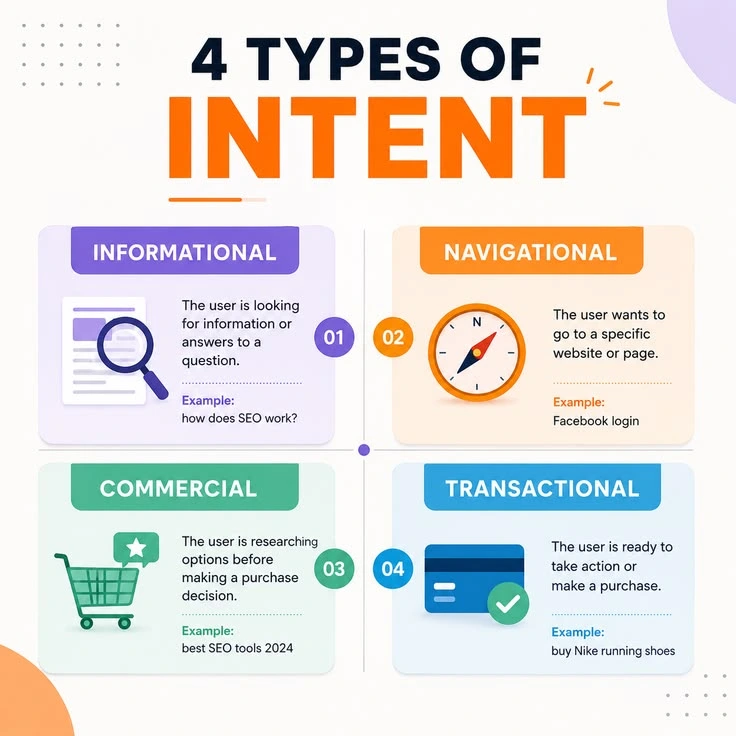
Search intent is the motive for performing a search. If someone searches for “what is SEO” on Google, they want to understand the basics of search engine optimization.
But if he searches for “SEO Course in Thrissur”, he wants to join the course.
First, search your keyword on Google and check the top-ranking pages. See whether the results are blog posts, lists, or product pages. This will tell you what Google thinks people want. Your task is to provide them with the same information, just better.
I’ve come across very well-written content that was not successful due to the wrong search intent of the reader. Always check the search intent before creating your content.
For reference, I wrote a blog on the topic SEO blog post: from keyword to publish.
Step 3: Show Real Experience (E-E-A-T)
Experience, Expertise, Authoritativeness, and Trustworthiness – all of this makes up E-E-A-T. It is what Google uses to identify high-quality content, which forms an essential part of SEO basics. You can learn more details from Google’s Helpfulness Content Guidelines.
Here is what each element looks like in practice:
Experience: Demonstrate your experience doing something. Provide screenshots, results, and mistakes.
Expertise: Explain everything correctly and clearly. Include an author bio that shares your background, experience, and expertise.
Authoritativeness: Use references from reputable sources and get mentioned on other websites in the future.
Trustworthiness: Be honest. State the date, update outdated facts, and admit failures.
Be conversational.Write short sentences and use simple words to make your content easy to understand. If you cannot understand your sentence, rephrase it.
Step 4: Set Up On-Page SEO
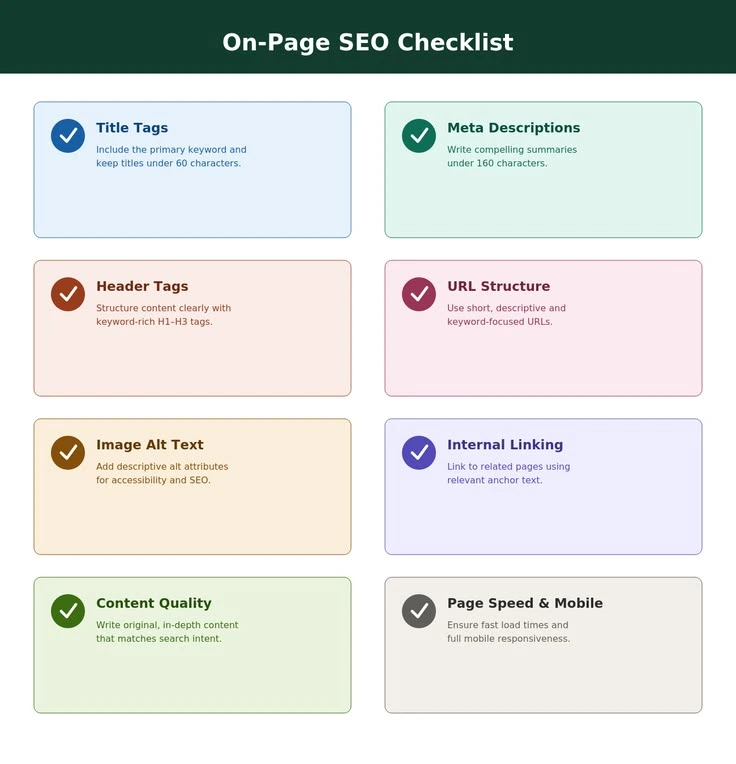
On-page SEO refers to the factors present on the page itself. All of them are small by themselves, but taken together, they tell Google what your article is all about. Use this checklist as a guide when writing each article:
- Title: primary keyword near the beginning, under 60 characters
- Meta description: clear one or two sentences with the keyword in them, less than 160 characters
- URL: clear and concise URL, something like /SEO-fundamentals-beginners-guide
- First paragraph: the keyword among the first 100 characters
- Headers: H1 header and clear H2 and H3 headers with a couple of the keyword in them
- Images: proper alt text for the image
- Internal linking: link to your other related posts
- External linking: link out to authoritative sources
Do not keyword stuff. The target is to have your primary keyword appear at 1% of your content, around one appearance per 100 words.
Step 5: Build Topical Authority
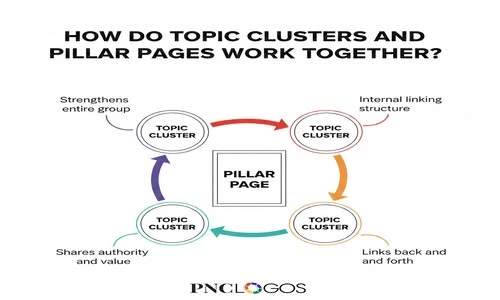
Topical authority involves Google recognizing your website as a credible source of information on one particular topic. One achieves this by creating content on one topic rather than anything else.
The simplest way of creating topical authority is by following the pillar and cluster strategy. Pillar content is long-form content that covers a wide range of topics. On the other hand, cluster content is smaller content that digs deeper into a certain area. The links between pillars and clusters go both ways.
Local SEO is the pillar of my blog, while the cluster pages include rankings on Google Business Profile, Local Citations and Google Ratings. Learn the complete process through content pillars and clusters.
Step 6: Fix the Technical Basics
The development of any skills is unnecessary. You just have to make sure that your website contains the following features: responsive design, fast loading time, using HTTPS, and an XML sitemap which is added to Google Search Console. The menu should be straightforward enough so that all of your users can access any page in just two clicks.
Step 7: Track Results and Refresh Old Posts
SEO does not work on “publish and forget.”Google Search Console is a free tool that shows which search queries bring visitors to your website. Do a refresh of your old articles every few months – update the facts that may be outdated, rewrite the title, add an extra example, and fix any broken links.
I talk about this in the guide to performing content audits.
The timeline depends on your competition and other factors, such as how long your site has existed and how frequently you publish content.
Mistakes Beginners Should Avoid
- Not researching the search intent before writing
- Keyword stuffing
- Not using any internal links
- Publishing low-quality content that does not have any unique point
- Copying someone else’s content without sharing your own experience
- Anticipating success in one week
FAQs About SEO Fundamentals
Is it mandatory for me to use any paid tools to learn the SEO fundamentals?
No, because the use of Google Search Console, Google Keyword Planner, and Google Analytics are free.
What should be the length of your blog post?
Whatever the length needed for covering the topic. Usually, blogs are from 1,200 to 2,000 words but of course, everything must be practical.
How can one define a pillar page and a cluster page?
The pillar page covers a wider subject matter. The cluster page covers some aspect of the subject matter and refers back to the pillar page.
How long would it take to see results of SEO?
This varies. Patience would normally be needed for small sites that chose competitive subjects.
Conclusion
SEO fundamentals aren’t difficult. Choose one relevant keyword, satisfy the search intent, write from your experience, take care of your on-page optimization, become a topic authority, keep your website healthy, and update your content.
Just start small. Choose one article and do that. Need the next step? Try my beginner’s on-page SEO checklist for your next article.
Author,
Remya Nair E, Digital Marketing Consultant in Thrissur
Review my page for another informational blogs.
Pingback: 7 Free vs Paid Keyword Research Tools: Avoid Costly Mistakes
Pingback: SEO Blog Post: 7 Easy Steps From Keyword to Publish